
Cut inventory, raise supply capability. Right inside SAP Business One.
The B1 order assistant orders whatever is in your planning data. We make sure the right thing is there: EazyStock computes forecasts and order proposals on your B1 data every night, and approved proposals appear as purchasing documents in the morning. Via the ready-made standard connector, without an ERP switch.
Can SAP Business One optimise inventory automatically?
Only to a limited extent. The MRP run covers demand against minimum stock and planning data that you maintain per article. You create sales forecasts yourself. An inventory optimisation like EazyStock closes that gap, computing on your B1 data every night.
How does EazyStock get the B1 data?
Via the ready-made standard connector, through the Service Layer or DI-API. Runs with HANA and SQL installations, on-premises and hosted. Your B1 partner only creates an integration user. Go-live in 4–6 weeks.
Does EazyStock replace the B1 MRP?
No, it adds to it: forecasts, up-to-date parameters, prioritised proposals. Whatever your purchasing approves appears as a purchasing document in the familiar B1 cockpit.
Ever run into this in Business One?
Four points where MRP and the order assistant in B1 hit their limits. With links into the SAP docs so you can read up yourself.
You maintain planning data per article by hand.
Minimum stock, maximum stock, procurement method, order interval: all of it sits in the item master and needs maintaining. If lead times or demand shift, the values are out of date, and the MRP run computes cleanly on the wrong basis. The larger the assortment, the more master-data maintenance becomes the actual planning work.
Planning data in the SAP B1 docs ↗The MRP run covers demand, it doesn't forecast.
MRP in B1 computes cleanly against orders, minimum stocks and lead times. But the sales forecast that feeds into it is something you create yourself, article by article, period by period. A statistical forecast with trend, dispersion and outlier cleansing doesn't exist. In practice that means: the forecast is only as good as the time someone invested in it.
MRP and forecasts in the SAP B1 docs ↗Seasonal articles run on fixed minimum stocks.
A minimum stock that fits in March is wrong in October. B1 knows no seasonal curves per article: either you re-maintain the planning data several times a year, or you hold peak stock all year round. Usually it's the latter, and the capital sits unused on the shelf for ten months.
SAP Business One overview ↗You plan promotions and projects around the system.
A promotion, a large order in the pipeline, a new sales channel: the extra demand is in no history and no forecast period you captured months ago. You plan it in Excel next to the system, and the MRP run keeps running unperturbed at normal levels until the first items are missing.
Sales forecasts in the SAP B1 docs ↗Where does that lead for you?
Manual planning via planning data is error-prone. We know the pattern from many intro calls:
Can it be done better? Of course: with EazyStock.
EazyStock computes on your B1 data and answers exactly the four problems above. Your team keeps ordering in Business One.
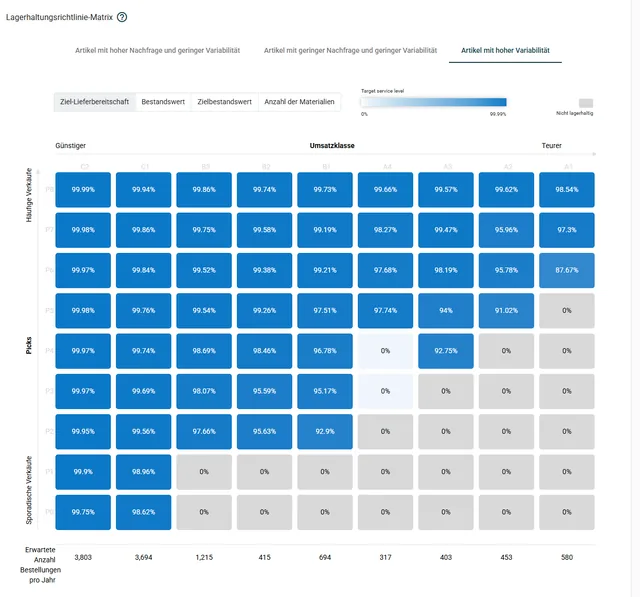
Up-to-date stock parameters.
Safety and reorder stock per article are recalculated every night, derived from your target supply capability. Maintaining the planning data is gone.
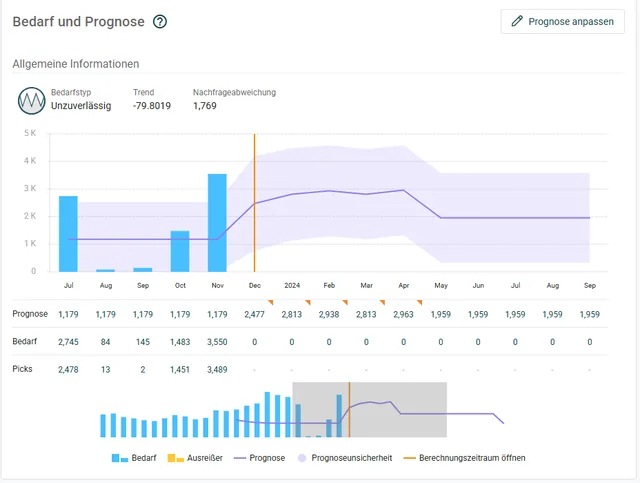
Real forecasts per article.
Trend, seasonality, outlier cleansing: EazyStock computes the forecast statistically, fresh every night. Nobody maintains periods by hand anymore.
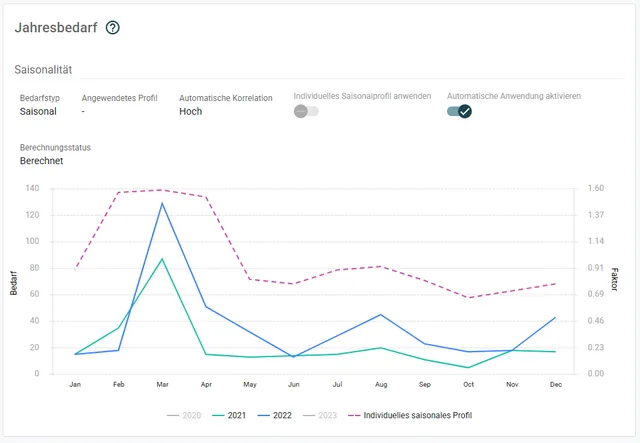
Seasonal articles detected automatically.
Demand patterns are classified per article, and seasonal curves flow directly into the proposals. The minimum stock breathes with the year.
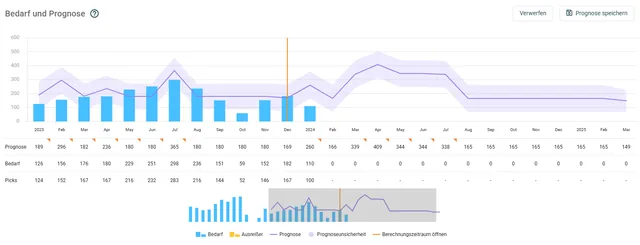
Upcoming demand, planned in today.
Promotion or large order planned? You enter the expected extra demand as a forecast adjustment. The order proposals move with it before the shortage becomes visible.
Connected via the Service Layer.
For SAP Business One there's a ready-made EazyStock connector: Service Layer or DI-API, depending on version and hosting. No custom development, no interface project.
Create an integration user
Your B1 partner creates an integration user and enables the Service Layer. We coordinate directly with them, so you don't have to translate anything.
Your effort: approx. 1–2 hours with your B1 partnerConfiguration and test runs
We configure mapping and business logic, including your user-defined fields (UDFs), and run test runs against your real data.
Your effort: a few clarifying questions, no developer neededNightly operation
Every night, articles, demand and orders flow to EazyStock. Approved proposals appear as purchasing documents in the familiar B1 cockpit in the morning.
Your effort: none in regular operationThe connector runs with HANA and SQL installations, in-house and at the hoster. User-defined fields from your installation are mapped. Only what your purchasing has approved is written.
The connector comes from EazyStock. The operation from us.
EazyStock maintains the B1 connector as a standard product; we add the method: goals and ordering rules in the configuration, test runs against your real data and a nightly operation we monitor. If something goes wrong at night, we hear about it first, not your purchasing.
“For our complex after-sales requirements we were looking for a solution to optimise working capital and spare-parts availability. Systempilot didn't just help us plan better, they integrated our business logic end-to-end.”

Common questions about SAP Business One and EazyStock.
How long does connecting SAP Business One to EazyStock take?
The integration user is created with your B1 partner in 1–2 hours. Then come data import, configuration of your business logic and test runs: expect 4–6 weeks to go-live, depending on data quality and assortment.
We run on HANA. Or on SQL. Does that work?
Both. The connector runs with HANA and SQL installations, on-premises and hosted, via Service Layer or DI-API, depending on version and hosting.
Does the system write into our Business One?
At night the connector only reads. The only thing written is what your purchasing has approved: order proposals appear as purchasing documents in the B1 cockpit, in the familiar approval process.
Our installation is full of user-defined fields. A problem?
No, more the rule. UDFs are included in the mapping, and customer-specific logic is modelled in the configuration, not in code.
Does EazyStock replace the MRP in Business One?
No, it adds to it. Forecasts, stock parameters and order proposals come from EazyStock; ordering and approval stay in Business One. Your team keeps its familiar interface and processes.
What does it cost?
The B1 connector is a ready-made standard product and part of the EazyStock project, not a separate interface development. Rollout projects start at around €5,000, and licence costs typically start at around €1,000 per month.
Get more out of your purchasing in Business One.
In the intro call we look at your assortment together and tell you honestly whether it pays off for you.
Arrange an intro call →