
NAV still running fine? Exactly. Optimise your inventory, not your ERP.
No reason for an ERP switch: EazyStock computes forecasts and order proposals on your NAV data every night, and approved proposals land as purchase lines in the morning. Exactly the connection that has been running at Deutsche Augenoptik for years. And if you later move to Business Central, it moves with you.
Can Dynamics NAV optimise inventory automatically?
Only to a limited extent. NAV plans via reordering policies and parameters you maintain per article by hand: reorder point, safety stock, lot sizes. A statistical forecast doesn't exist. An inventory optimisation like EazyStock closes that gap.
How does EazyStock get the NAV data?
Via OData and SOAP web services, from NAV 2013; older versions via a file interface. Your IT only publishes the needed pages as web services, and we supply the list. Go-live in 4–6 weeks.
Is it still worth it if we're moving to Business Central soon?
Yes. Forecasts, history and configuration live in EazyStock, not in the ERP. On the switch to BC we take the connection with us, without your planning noticing a thing.
Ever run into this in NAV?
Four points where NAV's planning hits its limits. With links into the Microsoft docs (Business Central; the planning logic comes from NAV) so you can read up yourself.
You maintain planning parameters per article by hand.
Reorder point, safety stock, minimum and maximum lot size, order cycle: NAV offers many levers, but you turn each one yourself, per article and location. If lead times or demand shift, the values are out of date, and the requisition worksheet computes cleanly on the wrong basis.
Planning parameters in the Microsoft docs ↗You enter the demand plan yourself.
NAV plans against known demand and against a demand forecast that someone fills by hand, article by article, period by period. A statistical forecast with trend, dispersion and outlier cleansing doesn't exist. In practice the plan is as current as the last afternoon someone had to spare for it.
Demand planning in the Microsoft docs ↗Reordering policies are static.
Fixed reorder quantity, top up to maximum, lot-for-lot, order: you pick a policy per article and store fixed values. Which articles deserve which policy and how high the values should be is something NAV doesn't tell you. Seasonal articles therefore run all year on the same settings.
Reordering policies in the Microsoft docs ↗You plan promotions and special demand separately.
A promotion, a large order in the pipeline, a new customer: the extra demand is in no history and no demand-forecast period from back then. You plan it in Excel next to the system, and the requisition worksheet keeps running unperturbed at normal levels until the first items are missing.
Demand planning in the Microsoft docs ↗Where does that lead for you?
Manual planning via planning parameters is error-prone. We know the pattern from many intro calls:
Can it be done better? Of course: with EazyStock.
EazyStock computes on your NAV data and answers exactly the four problems above. Your team keeps ordering in NAV.
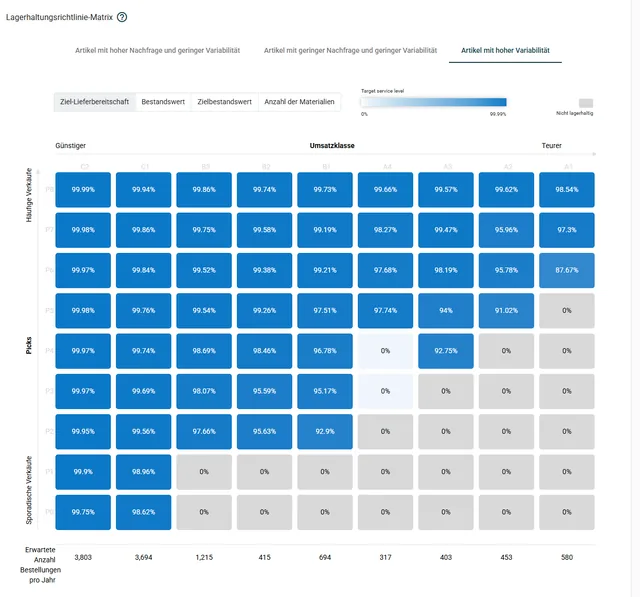
Up-to-date stock parameters.
Safety and reorder stock per article are recalculated every night, derived from your target supply capability. Parameter maintenance is gone.
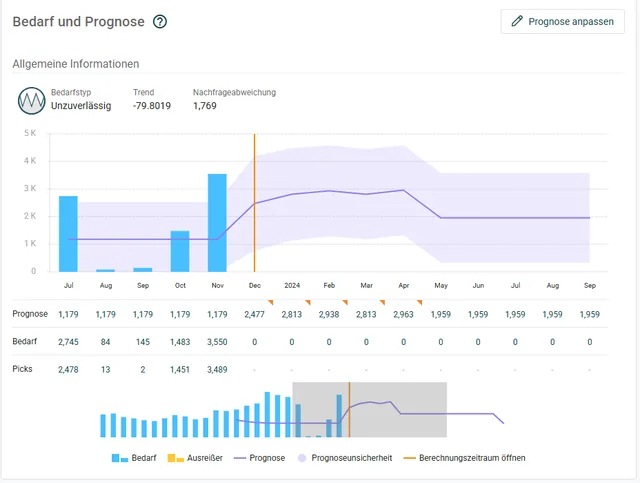
Real forecasts per article.
Trend, seasonality, outlier cleansing: EazyStock computes the forecast statistically, fresh every night. Nobody fills periods by hand anymore.
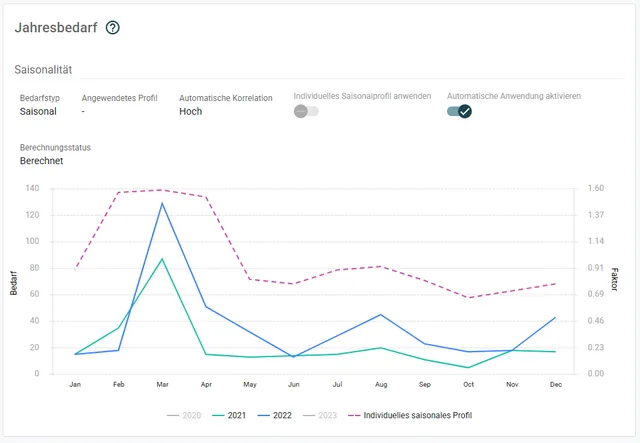
The right rule per article, dynamically.
Articles are classified by demand pattern and value, and seasonal curves flow in. The stocking rule moves with the article when it changes.
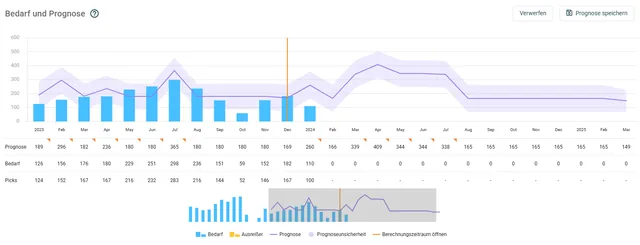
Upcoming demand, planned in today.
Promotion or large order planned? You enter the expected extra demand as a forecast adjustment. The order proposals move with it before the shortage becomes visible.
Connected via OData web services.
For Dynamics NAV there's a ready-made EazyStock connector; EazyStock is a Microsoft ISV partner. The connection runs via OData and SOAP web services, from NAV 2013; older versions we connect via a file interface.
Publish pages
Your IT or NAV partner publishes the needed pages as web services. We supply the exact list.
Your effort: approx. half a day with your NAV partnerConfiguration and test runs
We configure mapping and business logic and run test runs against your real data. Even heavily customised NAV installations are no exclusion criterion.
Your effort: a few clarifying questions, no developer neededNightly operation
Every night, articles, demand and orders flow to EazyStock. Approved proposals come back to NAV as purchase lines in the morning.
Your effort: none in regular operationThis exact connection has been running at Deutsche Augenoptik in daily operation for years: minus 38% inventory with stable supply capability. And if you later move to Business Central, we take the connection with us, without your planning noticing a thing.
The connector comes from EazyStock. The operation from us.
EazyStock maintains the NAV connector as a standard product; we add the method: goals and ordering rules in the configuration, test runs against your real data and a nightly operation we monitor. If something goes wrong at night, we hear about it first, not your purchasing.
“Systempilot helped us cut inventory by 38% by introducing different stocking strategies for equipment and spectacle lenses. I'd recommend working with them to anyone who wants to save money in tough times.”

Common questions about Microsoft Dynamics NAV and EazyStock.
How long does connecting Dynamics NAV to EazyStock take?
The pages are published as web services with your NAV partner in about half a day. Then come data import, configuration of your business logic and test runs: expect 4–6 weeks to go-live, depending on data quality and assortment.
Our NAV is old, 2013 or earlier. Does it still work?
Yes. From NAV 2013, OData and SOAP web services work; older versions we connect via a file interface. An old NAV is no reason to skip inventory optimisation, and even less a reason for a rushed ERP switch.
We'll move to Business Central at some point. Is it still worth it now?
Yes. Forecasts, history and configuration live in EazyStock, not in the ERP. On the switch we only swap the connection: NAV web services out, BC extension in. Your planning notices nothing, and the forecast history you've built stays intact.
Does the system write into our NAV?
At night the connector only reads. The only thing written is what your purchasing has approved: order proposals come back as purchase lines, in the familiar approval process.
Our NAV installation is heavily customised. A problem?
No, that's the rule with NAV. Customised tables and fields are included in the mapping. The reference installation at Deutsche Augenoptik isn't standard NAV either.
What does it cost?
The NAV connector is a ready-made standard product and part of the EazyStock project, not a separate interface development. Rollout projects start at around €5,000, and licence costs typically start at around €1,000 per month.
Keep NAV, optimise inventory.
In the intro call we look at your assortment together and tell you honestly whether it pays off for you.
Arrange an intro call →