
Cut inventory, raise supply capability. Right inside Business Central.
Business Central brings the most planning levers in its class. You still have to turn them yourself: EazyStock computes forecasts and order proposals on your BC data every night, connected as an extension from Microsoft AppSource. Approved proposals land in the standard purchasing module in the morning.
Can Business Central optimise inventory automatically?
Only to a limited extent. BC plans via reordering policies and parameters you maintain per article by hand, the ABC classification is manual work, and you enter the demand plan yourself. An inventory optimisation like EazyStock closes that gap.
How does EazyStock get the BC data?
Via the EazyStock extension from Microsoft AppSource, authenticated by OAuth2 against Entra ID. Runs in the cloud and on-premises, with setup possible per tenant. Go-live in 2–4 weeks.
Does EazyStock replace BC's planning?
No, it adds to it: forecasts, up-to-date parameters, prioritised proposals. Whatever your purchasing approves lands in the standard purchasing module of Business Central.
Ever run into this in Business Central?
BC's planning can do a lot, but demands a lot of maintenance for it. Four points where it gets tight. With links into the Microsoft docs so you can read up yourself.
You maintain planning parameters per article by hand.
Reorder point, safety stock, lot sizes, order cycle: BC offers more levers than most systems in its class, but you turn each one yourself, per article and location. And the ABC classification that's meant to justify your rules is manual work too: barely entered, it's already out of date.
Planning parameters in the Microsoft docs ↗You enter the demand plan yourself.
BC plans against known demand and against a demand forecast that someone fills by hand, article by article, period by period. A statistical forecast with trend, dispersion and outlier cleansing isn't part of the standard. The plan is as current as the last afternoon someone had to spare for it.
Demand planning in the Microsoft docs ↗Reordering policies are static.
Fixed reorder quantity, top up to maximum, lot-for-lot, order: you pick a policy per article and store fixed values. Which articles deserve which policy and how high the values should be is something BC doesn't tell you. Seasonal articles therefore run all year on the same settings.
Reordering policies in the Microsoft docs ↗You plan promotions and special demand separately.
A promotion, a large order in the pipeline, a new sales channel: the extra demand is in no history and no demand-forecast period from back then. You plan it in Excel next to the system, and the requisition worksheet keeps running unperturbed at normal levels until the first items are missing.
Demand planning in the Microsoft docs ↗Where does that lead for you?
Manual planning via planning parameters is error-prone. We know the pattern from many intro calls:
Can it be done better? Of course: with EazyStock.
EazyStock computes on your BC data and answers exactly the four problems above. Your team keeps ordering in Business Central.
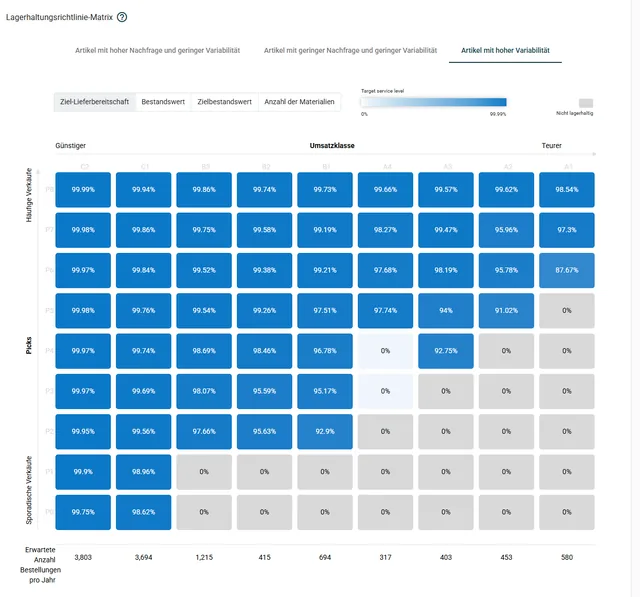
Classification and parameters, automatically.
Articles are classified every night by demand pattern, value and pick frequency. Safety and reorder stock derive from your target service level, not from an ABC list from back then.
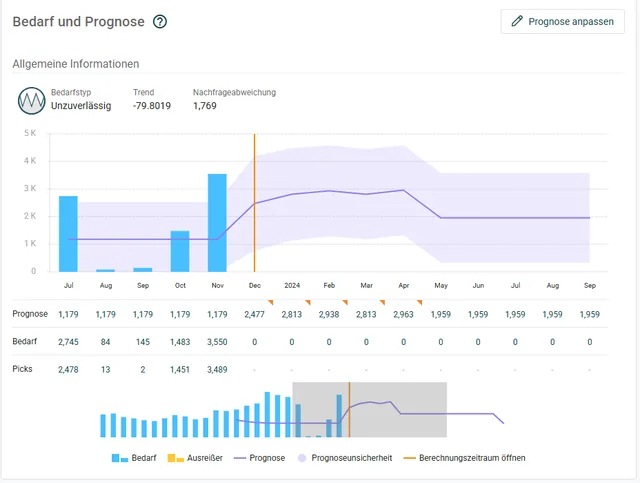
Real forecasts per article.
Trend, seasonality, outlier cleansing: EazyStock computes the forecast statistically, fresh every night. Nobody fills periods by hand anymore.
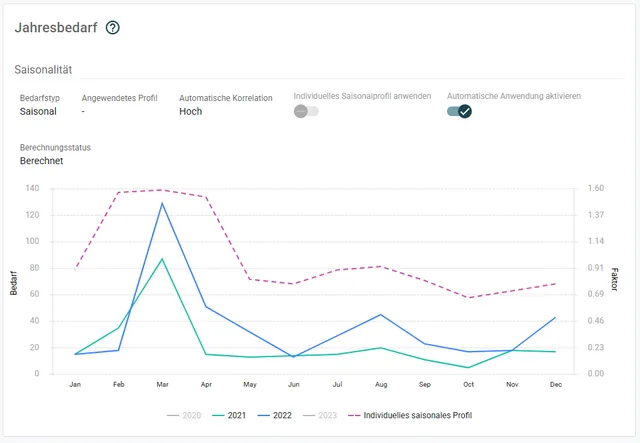
The right rule per article, dynamically.
Seasonal curves are detected and stocking rules move along when an article changes. No off-the-shelf policy for the whole year.
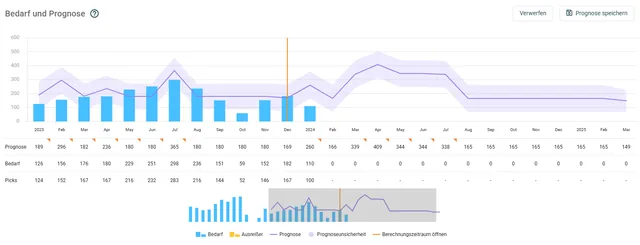
Upcoming demand, planned in today.
Promotion or large order planned? You enter the expected extra demand as a forecast adjustment. The order proposals move with it before the shortage becomes visible.
An extension from AppSource.
For Business Central there's a ready-made EazyStock extension in Microsoft AppSource; EazyStock is a Microsoft ISV partner. The most modern connection in the library: install, authorise, get going.
Install the extension
You install the EazyStock extension from Microsoft AppSource and grant the permissions in your Entra ID. Instructions included.
Your effort: approx. 1 hour of admin timeConfiguration and test runs
We configure mapping and business logic, on request separately per tenant, and run test runs against your real data.
Your effort: a few clarifying questions, no developer neededNightly operation
Every night, articles, demand and orders flow to EazyStock. Approved proposals land in the standard purchasing module in the morning.
Your effort: none in regular operationThe extension contains nothing customer-specific: BC updates and extension updates run without a customisation project. Your business logic lives in the EazyStock configuration, and setup per tenant is possible. If you're coming from NAV, we take the existing connection with us.
The connector comes from EazyStock. The operation from us.
EazyStock maintains the BC extension as a standard product; we add the method: goals and ordering rules in the configuration, test runs against your real data and a nightly operation we monitor. If something goes wrong at night, we hear about it first, not your purchasing.
“Systempilot helped us cut inventory by 38% by introducing different stocking strategies for equipment and spectacle lenses. I'd recommend working with them to anyone who wants to save money in tough times.”

Common questions about Microsoft Business Central and EazyStock.
How long does connecting Business Central to EazyStock take?
The extension is installed and authorised from AppSource in about an hour. Then come data import, configuration of your business logic and test runs: expect 2–4 weeks to go-live, depending on data quality and assortment.
We run on-premises, not in the cloud. Does that work?
Yes. The connection runs in the BC cloud and on-premises, authenticated by OAuth2 against your Entra ID.
Does the extension cope with BC updates?
Yes. The extension deliberately contains nothing customer-specific; your business logic lives in the EazyStock configuration. BC updates and extension updates therefore run without a customisation project.
We have several tenants. Does that work?
Yes. Setup is possible per tenant, and each tenant gets its own configuration.
Does EazyStock replace BC's planning?
No, it adds to it. Forecasts, stock parameters and order proposals come from EazyStock; ordering and approval stay in Business Central. Your team keeps its familiar interface and processes.
What does it cost?
The BC extension is a ready-made standard product and part of the EazyStock project, not a separate interface development. Rollout projects start at around €5,000, and licence costs typically start at around €1,000 per month.
Get more out of your purchasing in Business Central.
In the intro call we look at your assortment together and tell you honestly whether it pays off for you.
Arrange an intro call →